
If you wish to receive push notifications from SWAG in a timely manner, please first open the official SWAG website using Safari (iOS) or Chrome (Android), and select "Add to Home Screen" to install it as a progressive web app (PWA) shortcut.
📱 Setup Steps
Once installed, open SWAG directly from the shortcut on your home screen and follow these steps:
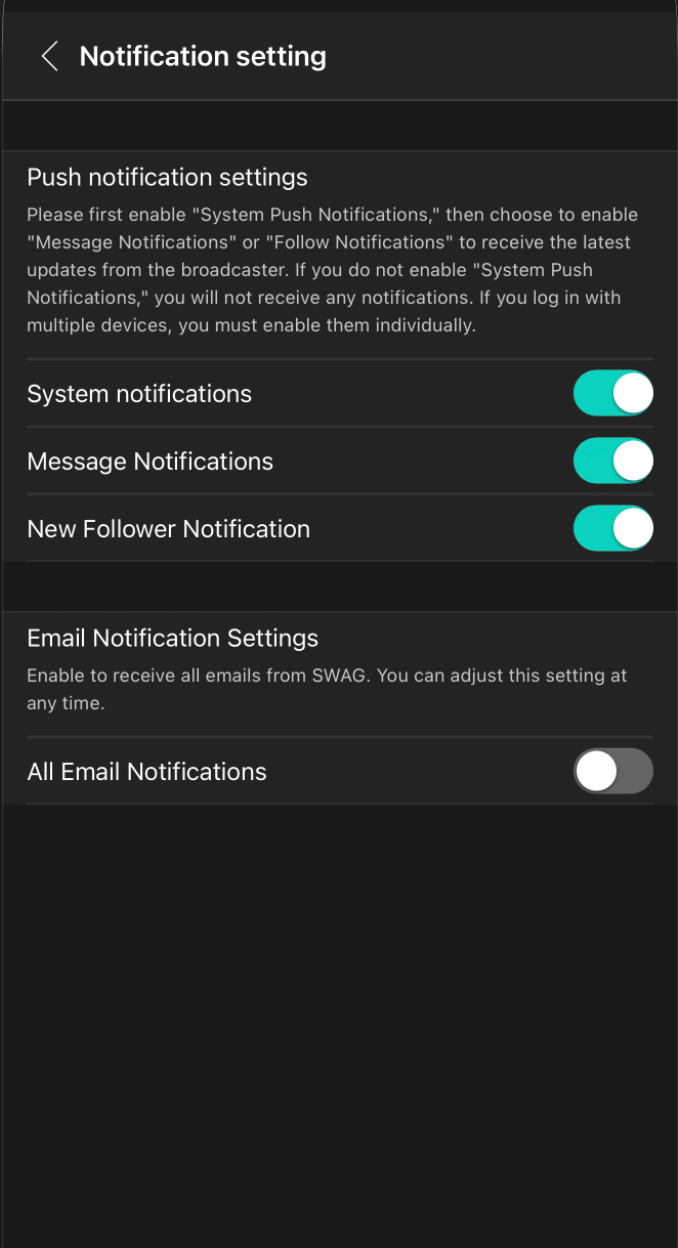
Tap your [Profile Picture] in the bottom-right corner ➔ [Settings] ➔ [Push Notifications].
Make sure the notification types you want to receive (e.g., Direct Message notifications, Following notifications) are enabled.
📌 System Requirements
iOS Users: Requires iOS 18.5 or later, and notifications can only be received when launched via the home screen shortcut (PWA).
Android Users: Supports receiving push notifications when installed via Chrome as a home screen shortcut (PWA).
⚠️ Important Reminder: Check Device Permissions
Please make sure system-level notification permissions are enabled on your phone. If notifications are blocked by your device settings, you will not receive push notifications even if they are enabled within SWAG.
💡 Still not receiving notifications?
If you have completed the steps above and still do not receive notifications, please feel free to contact our Online Customer Support. We will assist you as soon as possible. Thank you!