
You can customize your display name on SWAG so that other users or creators can recognize you more easily.
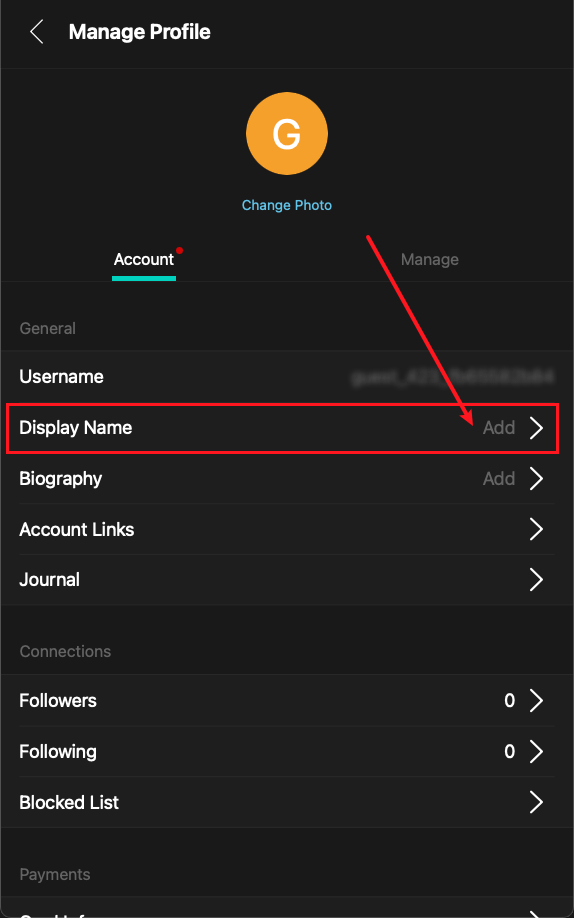
To add or edit your display name, please follow the steps below:
Profile Center → Settings → Manage Profile → Nickname
https://swag.live/manage-profile/display-name
Supported Display Name Formats
SWAG display names support the following:
All language characters are supported.
Uppercase and lowercase English letters are supported.
Spaces are supported, but spaces at the beginning or end of the name are not allowed.
Symbols are supported.
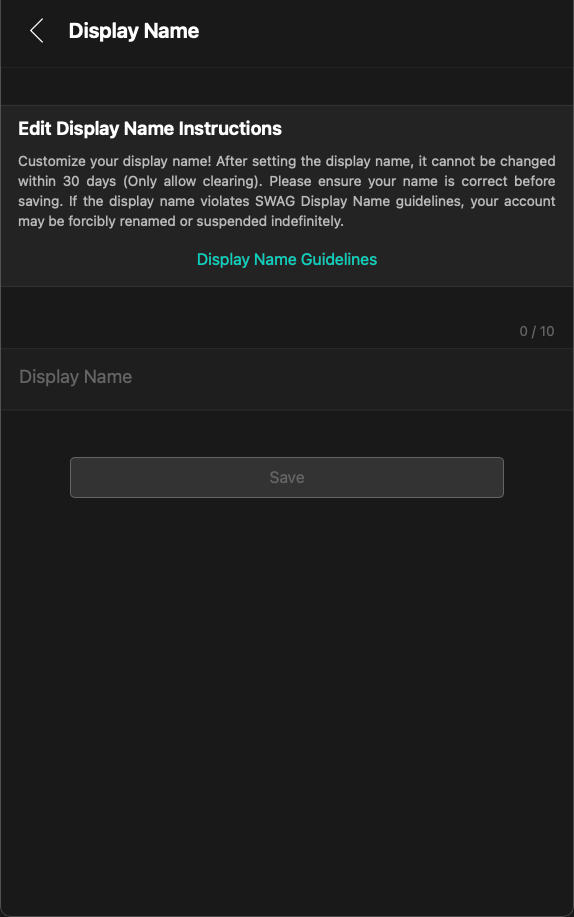
The display name can contain up to 10 characters.
If you enter 0 characters and save, it will be treated as clearing your display name.
Important Notes for Editing Your Display Name
After setting your display name, you will not be able to change it again within 30 days. The restriction resets daily at 00:00.
Therefore, please make sure your display name is correct and complies with the platform guidelines before saving it. If your display name does not comply with the SWAG Display Name Guidelines, your name may be forcibly changed by the platform. In serious or repeated violation cases, your account may also be subject to indefinite suspension.
If you clear your display name and save it, the system will treat this as removing your display name.
What Display Names May Be Considered Violations?
When you see a name, you should generally be able to tell whether it is appropriate. If a name is likely to offend others, mislead users, or create platform safety risks, it may not comply with the SWAG Display Name Guidelines.
The following types of names may be considered inappropriate:
1. Hateful, discriminatory, or offensive content
Do not use names that attack, imply discrimination against, or express hatred toward any individual or identity group. This includes content related to culture, race, gender, social identity, religion, political views, nationality, and similar categories.
Using homophones, alternative wording, modified characters, or implied expressions may also be considered a violation.
2. Violence, threats, or self-harm-related content
Do not use names that contain threats, violence, suicide, self-harm, or other intimidating language.
3. Impersonating official personnel or others
Do not pretend to be SWAG official staff, customer support, an agency representative, another user, creator, or coin seller.
Such names may cause confusion, mislead others, or create fraud risks.
4. Promotion, advertising, or traffic redirection
Do not include advertisements, promotional content, external platform information, transaction invitations, or other unauthorized commercial content in your display name.
5. Offensive content or infringement of others’ rights
Do not use display names that may offend, harass, or infringe upon the rights of others.
6. Profanity, drugs, or illegal content involving minors
Do not include profanity, drug-related terms, or any illegal content involving minors.
7. Personal information or identifiable details
To protect your personal information, please do not include phone numbers, addresses, messaging account IDs, personal identity information, or other identifiable details in your display name.
Violation Handling
If a display name does not comply with the above guidelines, any user, creator, or customer support agent may mark the name as a violation.
If you see an inappropriate display name, you may contact online customer support to report it. If you are unsure whether a name violates the guidelines, you may also contact online customer support, and the official team will assist with the review.
If SWAG requires you to change your display name, please choose your new name carefully. If your account is repeatedly reported or repeatedly uses display names that do not comply with the guidelines, the platform may permanently suspend your account.
How Can I Get Additional Name Change Attempts?
VIP Member Nickname Change Privilege
In general, once a display name is set, it cannot be changed again within 30 days. However, you may obtain additional nickname change attempts by increasing your VIP membership level.
With the “Nickname Change Privilege,” you can adjust your display name according to your mood, style, or current identity, allowing you to show a more distinctive personal profile.
Different VIP levels provide different numbers of monthly name changes, with a maximum of 4 changes per month. The actual number of available changes is subject to the VIP page display.
Monthly Nickname Change Attempts
Lv. 40 - 59: 1 time per month
Lv. 80 - 99: 2 times per month
Lv. 80 - 99: 3 times per month
Lv. 100: 4 times per month
Steps
If you are already a member who meets one of the VIP levels listed above, and you need to add or edit your display name, please follow the steps below:
Profile Center → Account Level → Nickname Change Privilege → Try Now
https://swag.live/settings/vvip