
1-on-1 matches are exclusive spaces for you and your fans.
With no boundaries on content, you can deliver the ultimate personalized experience for your supporters!
💰 Revenue Sources
* Per-Minute Billing: Charged based on the duration of fan viewing (per minute)
* Gifts: Digital gifts sent by fans
* Interactive Commands: Standard Commands (e.g., Teasing Performances) & Toy Commands
⚠️ Important Notes
* Minimum Duration: Each 1-on-1 session must last at least 5 minutes. If a creator leaves early, no earnings will be rewarded for that session.
* Fan-Initiated: Creators cannot initiate a 1-on-1 session manually. A fan must actively send a "1-on-1 Mode" invitation to the streamer.
💎 How to Set 1-on-1 Diamond Rates
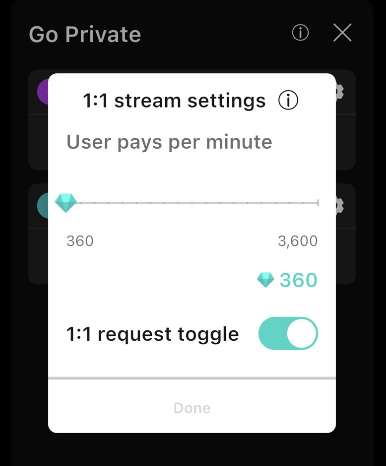
Creators can freely set their 1-on-1 rates within a range of 360 to 3,600 Diamonds per minute.
⚠️ Adjustment Rules
Rates can be modified either before going live or during a regular live stream. However, once a 1-on-1 session officially starts, the Diamond rate is locked and cannot be changed.
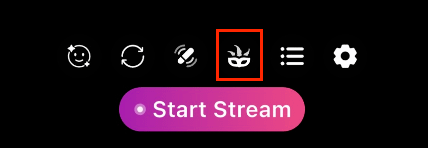
1. Tap the "Mask icon" on the bottom menu bar of the screen.
2. Tap the "Gear icon" .
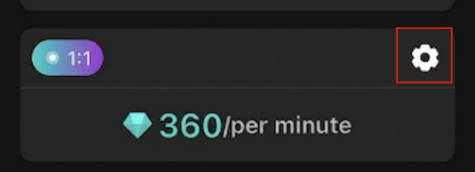
3. Adjust the per-minute Diamond rate to your preference.
Make sure to turn on the 1:1 request toggle! Only then can you receive 1:1 requests from your fans.
🎬 How to Start a 1:1 Live Stream
1. Receive Invitation: When a user sends an invitation, a "Requesting" prompt will appear in the top-right corner of your live stream screen.
2. Review Invitation: Tap the prompt to view the user's profile and decide whether to accept.
3. Time Limit: You have 3 minutes to respond to an invitation. If no action is taken within 3 minutes, the request will automatically be declined.
(Note: If a creator declines, the user must wait 5 minutes before sending another request.)
4. Countdown to Switch: After tapping "Accept", a 1-minute countdown will begin. Once the countdown ends, the stream will officially switch to 1-on-1 mode.
⚠️ Important Note: During the 1-minute countdown after accepting an invitation, settings are locked, and you cannot manually switch to other streaming modes.