What is "Show Mode" (Limited-Time Performance)?
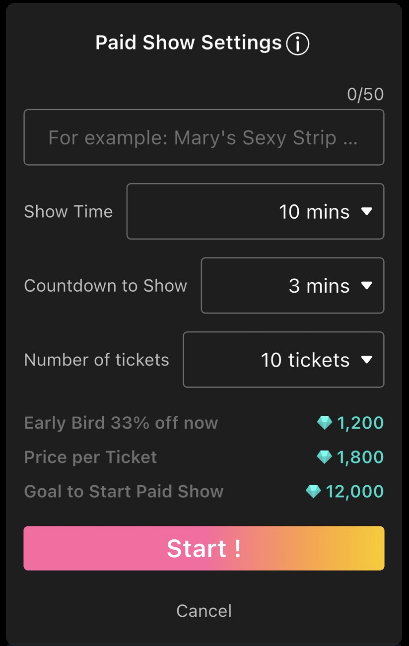
Creators can pre-set a performance theme, target ticket count, and duration to launch an exclusive ticket fundraising activity. Once the target is reached, the exciting performance begins!
No Limits on Content: Freely plan your own themed performances.
Higher Earnings Challenge: Rapidly accumulate ticket revenue within a specified time via the fundraising mechanism to push your earnings to the limit!
⚠️ Important Note: The performance title must clearly and specifically describe the actual content, and creators must strictly execute what is stated in the title. If the content does not match the title and is reported by users, the earnings will be deducted and refunded to the users as Diamonds.
💰 Revenue Sources Ticket Sales (Early Bird / Regular), Gifts, Commands (Standard / Toy-Connected)
🎟️ Pricing & Fundraising Rules
Fundraising Duration: Choose freely from 3 minutes, 5 minutes, or 10 minutes. (Tip: A shorter duration can attract users to buy tickets and start the show faster!)
Pricing Structure:
Early Bird Price: 1,200 Diamonds (Discounted price available only during the fundraising period)
Regular Price: 1,800 Diamonds (Standard price after the show officially starts)
Fundraising Results:
Target Reached: The system will automatically begin a 1-minute countdown to start the performance. After the show ends, you will receive all earned Diamond revenue.
Target Not Reached:
Select "Perform Anyway": The show starts as scheduled, and you can continue to sell the remaining tickets during the performance.
Select "Cancel Performance": The show is canceled, and all collected Diamonds will be fully refunded to supporters.
📲 Step-by-Step Guide
Access Mode Menu: After going live (default is Free Stream), tap the "Mode" button in the bottom-left corner of the screen.
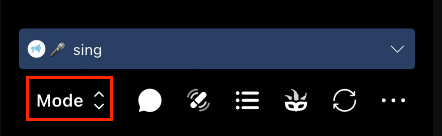
Switch Mode: Select "Show Mode".
Complete Setup: On the Show Mode setup page, fill in the Performance Title and adjust the Diamond (Ticket Price) Settings to launch your fundraising!