
🚀 Still editing highlights manually? Leave the tedious work to AI and just focus on shining!
While you live stream, our proprietary AI algorithm automatically detects top moments. After your stream, the system auto-edits the best parts into eye-catching short videos and Stories! Double your traffic effortlessly in minimal time! ❤️🔥
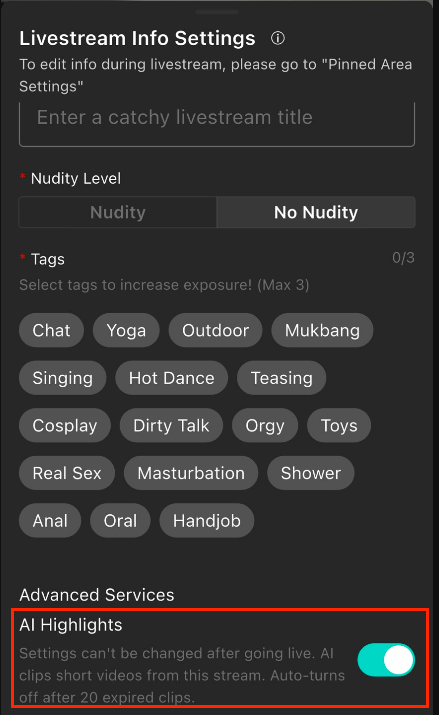
Simply enable the feature in "Live Info Settings" before going live, and AI will lock onto your highlight moments in real time.
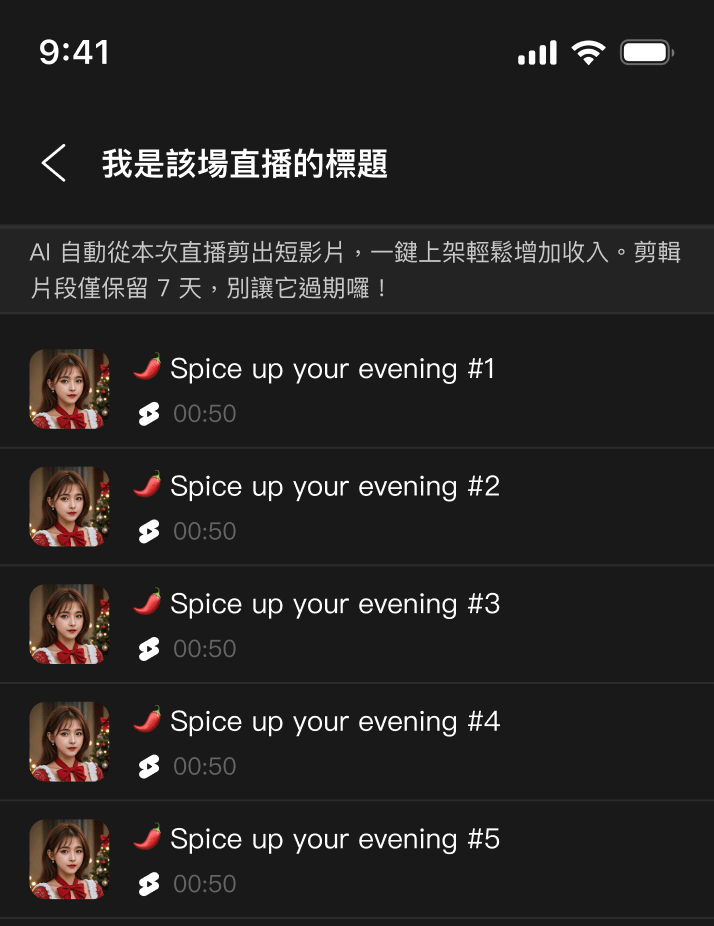
After the stream ends, AI-edited clips will automatically be sent to the "Live Highlights" section in your Moor Drafts.
All highlight clips will be saved in your "Live Records" for 7 days, ready for you to edit and publish anytime.
⚠️ Important Reminders Before Going Live
Settings cannot be changed mid-stream: The "AI Highlight Clips" feature must be turned on in Live Info before going live; settings cannot be changed once live.
Smart System Evaluation: If you do not receive highlight clips after streaming, it means the stream did not meet the system's threshold for saving highlights. Consider adjusting your stream's interactive content.
Storage Management Mechanism: When expired and unhandled clips accumulate to 20, the system will automatically disable this feature.
📖 Guide to Using Highlight Clips
STEP 1|Locate Edited Files
After streaming, you can find your AI-edited content via two paths:
Path A (Live Records): Go to "Personal Center" ➔ "Published" ➔ "Live Stream", then select the corresponding session to view results.
Path B (Drafts): Go directly to "Drafts" ➔ "Live Highlights".
STEP 2|Set "Editing Complete" Instant Notifications
No more waiting blindly! Turn on notifications to know the moment your clip is ready:
Open the Moor App and tap "Personal Center" in the bottom right corner.
Tap the "Gear (Settings)" in the top right corner ➔ "Notification Settings".
Turn on "AI Highlights Completed Notification".
Once completed, a notification will pop up at the "Bell icon" in the top right corner. Tap it to go directly to the publishing page!
STEP 3|Make the Most of the 7-Day Golden Publishing Window
All AI highlight clips are stored on the pending page for 7 days only and will be automatically cleared afterward.
Be sure to edit and upload in time to keep converting your best moments into followers!